

Choose what you want to inspect outside the journal before exporting to CSV. You might compare known risk levels, check a particular set of entries or preserve the rows used in a review. Define the question and selection before downloading the file.
Santrade offers different exports for Journal and Deep Analytics. Their rows have different meanings, and neither file contains every part of the account. Choose the export whose unit matches the work you intend to do.
Define the selection and its purpose
Set the account, dates and relevant filters in the view you are exporting. Record those choices in your own review material, including the date of the export. A file is easier to interpret later when its selection can be reconstructed.
Suppose you want to inspect records that lack a session. First identify that specific gap rather than exporting unrelated history and relying on memory to explain what you meant to check. The missing-details workflow provides a starting point.
Keep the original download unchanged while you work in a separate analysis copy. This lets you distinguish exported source values from formulas, categories and corrections you later add in another tool.
Read Journal rows as records
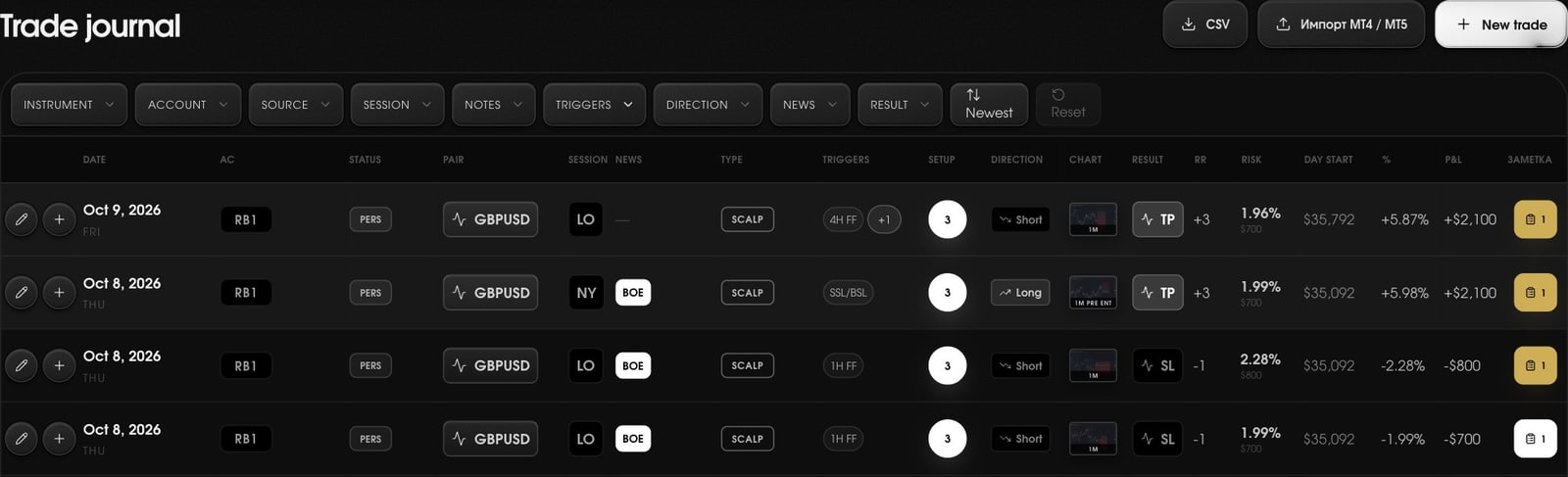
Journal exports all records in the current filtered selection, rather than only the visible table page. Its columns include date, account and phase, instrument, session, news, style, entry reasons, setup reference, direction and result.
Financial and review columns include the saved RR, risk, risk unit, Day Start, closed P&L, description, Notes titles and trade-group identity. A plan or Processing record is not assigned an invented realized P&L in the export.
Keep related columns together. The number in Risk needs its unit, and a percentage-to-money conversion needs the relevant positive Day Start. Exported RR is the saved field, not automatically the complete signed realized-R calculation you may want for a new analysis.
The cash and R explanation gives that distinction context. A blank value needs interpretation before it becomes a number in a spreadsheet formula.
Identify what the CSV leaves behind
The Journal file does not include chart images, complete Workspace documents, full descriptions of reusable Notes, the full Money Log or raw MetaTrader execution history. A Notes title identifies a link but does not contain everything written in that card.
Similarly, a setup reference is not the whole model document. Keep the appropriate source material if the review depends on its text or examples. A complete-looking row of fields cannot replace an image that was never included in the file.
CSV reimport is not a supported recovery route. Preserve separate originals and needed materials rather than treating the download as a complete restorable account backup.
Choose Deep Analytics for grouped comparisons
The analytics export contains the rows of the selected breakdown and its metrics. For example, a setup row summarizes the relevant ideas; it is not a list of every individual execution. The account breakdown has its own account-execution basis.
Search and other view choices can limit the presented rows. Record the breakdown and filters alongside the file so a later reader knows which groups were represented. A grouped table and a raw Journal export can therefore answer different questions about the same history.
For risk brackets that the current analytics interface does not provide natively, a separate risk-level comparison can use exported inputs and your own predefined intervals. Label that work as external analysis rather than a built-in grouping.
Inspect the file in the receiving spreadsheet
Check dates, decimal handling, empty values and text columns after opening the CSV. Keep account names and identifiers recognizable. Automatic formatting in another application can change how a value appears even though the downloaded text remains the same.
Santrade quotes CSV fields and adds a leading apostrophe to formula-like user text. If you see that apostrophe, inspect the field's purpose before deleting characters simply to make a column look uniform.
Test any new calculation on a small known case. If the risk basis is missing, keep that result unknown rather than silently excluding the row or replacing the value with zero.
Keep the conclusion tied to the exported sample
When you save a finding, include the source file, selected window, unit and any further exclusions. Distinguish a correction supported by the source from a new label you chose after seeing the outcomes.
The filter-overfitting guide explains why a pleasing subset does not justify a claim about every future trade. Exporting the rows makes the selection inspectable; it does not resolve that limitation automatically.
Before passing the file to someone else, read the actual columns and include only the material needed for the question. Comments, account labels and other text may be personal. The exported copy then exists outside the journal and needs its own handling.