

A Calendar month is useful when you want to move from a period result to the days and ideas that produced it. Begin with one question: perhaps why a particular day differs from your recollection, or which records explain a large monthly contribution. Then keep the month and account mode visible as you inspect the details.
The Calendar has its own controls. Its selected month and account mode do not automatically become the same as the upper Dashboard selection or the Journal table's filters.
Choose the month and the appropriate mode
Navigate to the intended month and read the account selector. Options include All, Only Personal, Only Props, Only Phases, Only Live and an individual account. The choice changes which records belong to the view.
In All mode, the main financial totals include Personal and Live records. Challenge records can remain visible in day details with a CHALLENGE indication. An explicit phase or account selection can include a different set, so a larger detail count is not automatically a contradiction in the financial total.
Before taking notes, save the month and mode in your own review text. This small detail makes it possible to return to the same sample when checking an observation later.
Read the monthly totals as idea-based measures
The month shows Total RR, Total P&L and Total ideas for its included completed history. Plans and Processing records do not become completed calendar results. An empty day is not a BE trade; it may simply have no included completed record.
Total RR is signed and aggregates linked executions into ideas. Suppose one idea has two closed account executions, each losing $100 on $100 risk. The combined idea has -$200 on $200 risk, or -1R. Two independent ideas each losing 1R would instead contribute -2R.
If the required signed R inputs are unknown, the R total can be unavailable while a monetary total remains known. Read how money and percentages differ before comparing the Calendar with another screen's calculation.
Open a day under a specific question
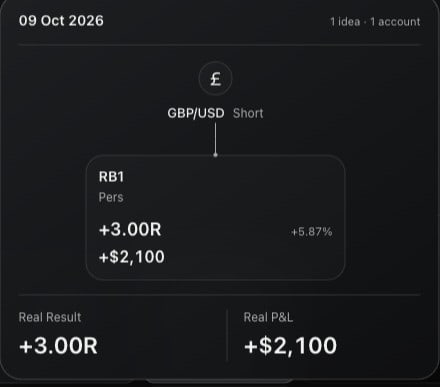
Choose a day because it matters to the review, rather than opening only the most profitable date. The detail view organizes ideas and their account executions. Check the phase, signed R, trade percentage and P&L where available.
Expand the relevant idea and inspect its members. The money on one account can differ from the combined idea, and a group may have different amounts or risk bases. Read the saved descriptions and charts when the question concerns a decision rather than the number alone.
A simple review note might say, “This day's total is mainly explained by one linked idea; inspect the account executions and the entry record.” It does not infer a cause from the colour of a calendar cell.
Distinguish the record date from execution cash dates
Closed records appear according to their saved date. For an imported MT5 position, that can be the final-close date even when partial exits or fees affected cash on earlier days. The Calendar is not a separate cell for every cash event in a position.
Use the partial-close explanation if a profit appears in the completed result later than some of its actual cash movements. Inspect the execution details and the ledger rather than moving the closed record simply to imitate a cash-flow timeline.
The same date awareness matters for your own comments. If an observation was written during a later review, identify it as later instead of implying that it was captured on the day shown in the Calendar.
Check the edges of the displayed weeks
A Calendar grid can show adjacent dates to complete a week. A weekly cell can therefore span dates outside the selected month. The monthly total uses the month boundary. Adding all visible weekly totals is not a reliable proof of the selected month's total.
Keep the unit of counting clear as well. A day detail tree can include Challenge ideas that are outside All mode's main financial inclusion. Do not use every visible detail count as the denominator for a personal or Live-only conclusion.
If a figure still seems unexpected, return to one known record and trace its date, mode and account membership. This is easier to verify than trying to explain the whole grid at once.
Save the observation and its next check
Record the selected month, account mode, relevant dates and the specific idea you need to examine. Add any data gap you found, such as unknown risk or a missing explanation of a management change.
You can keep a Calendar snapshot of the selected view. It is a static image, so retain the question and source details separately. A broader monthly review can then bring the calendar observation together with your plans, rule assessments and recurring decisions, without asking the calendar alone to explain them.